> ## Documentation Index
> Fetch the complete documentation index at: https://docs.runloop.ai/llms.txt
> Use this file to discover all available pages before exploring further.
# Managing Account Secrets
> Securely manage API keys, tokens, and other sensitive configuration data at the account level
Start with the [Runloop Quickstart](/docs/tutorials/quickstart) to use the examples below.
## Overview
Account-level secrets provide a secure way to manage sensitive configuration data such as API keys, tokens, passwords, and other credentials that your AI agents need across multiple Devboxes. Secrets are encrypted at rest and automatically made available as environment variables in your Devboxes.
Account secrets are credentials you inject **into** devboxes (for example, third-party API keys your agent code needs). They are different from Runloop API keys, which authenticate **your** requests to the Runloop platform. To manage Runloop API keys, visit the [Settings page](https://platform.runloop.ai/settings#api-keys).
### Key Features
* **Encrypted at Rest**: All secret values are encrypted using industry-standard encryption
* **Global Availability**: Secrets are accessible across all Devboxes in your account
* **Environment Variables**: Secrets are automatically injected as environment variables
* **Secure Access**: Secret values are never exposed in logs or API responses after creation
You can manage secrets in the Runloop Dashboard or programmatically using the Runloop SDK.
## Creating Secrets in the Dashboard
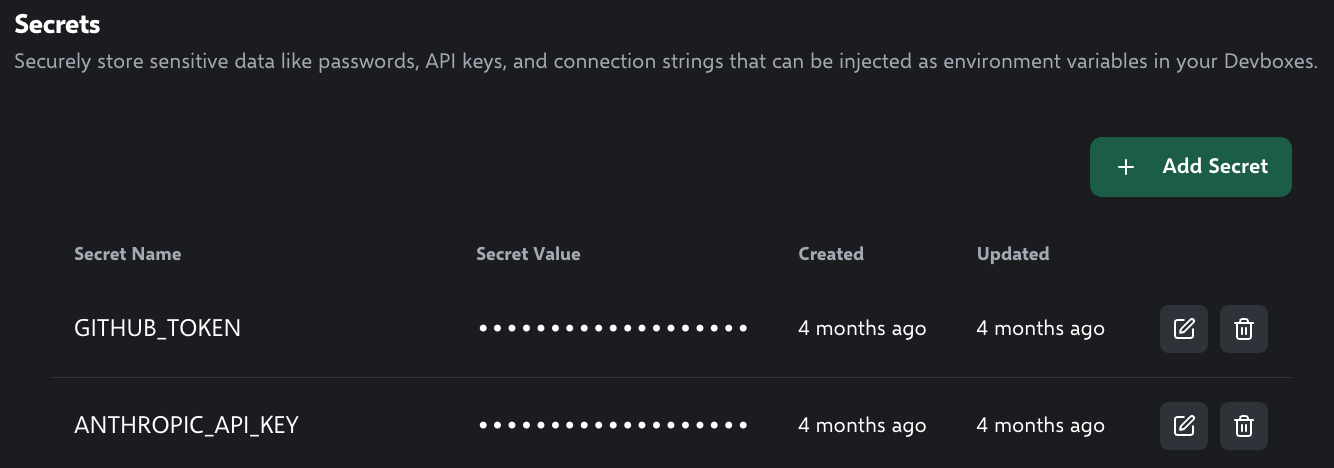 1. Navigate to the [Runloop Dashboard Settings](https://platform.runloop.ai/settings) page
2. Click on "Secrets" in the left sidebar
3. Click the "Add Secret" button
4. Enter a name for the secret (e.g. `SECRET_NAME`). This is the secret's logical name in the dashboard and may differ from the environment variable name you use inside a devbox.
5. Enter the value for the secret
6. Click the "Add Secret" button
## Creating Secrets Programmatically
Create a new secret with a globally unique name and value. The secret will be encrypted, and you can use it in any Devbox you choose.
```python Python theme={null}
secret = await runloop.api.secrets.create(
name="SECRET_NAME",
value="my-secure-secret-123"
)
print(f"Secret created with ID: {secret.id}")
```
```typescript TypeScript theme={null}
const secret = await runloop.api.secrets.create({
name: 'SECRET_NAME',
value: 'my-secure-secret-123'
});
console.log(`Secret created with ID: ${secret.id}`);
```
```bash curl theme={null}
curl -X POST \
'https://api.runloop.ai/v1/secrets' \
-H "Authorization: Bearer $RUNLOOP_API_KEY" \
-H 'Content-Type: application/json' \
-d '{
"name": "SECRET_NAME",
"value": "my-secure-secret-123"
}'
```
### Secret Naming Requirements
* Must be a valid environment variable name
* Alphanumeric characters and underscores only
* Globally unique across your account
* Examples: `API_KEY`, `DATABASE_URL`, `JWT_SECRET`
## Launching a Devbox with Account Secrets
You can launch a devbox with account secrets by specifying the `secrets` parameter. The key is what the secret will be called in the devbox's environment variables, and the value is the name of the secret in your account.
After creating a secret with the name `SECRET_NAME`, you can launch a devbox with it by specifying `secrets: { DEVBOX_SECRET: "SECRET_NAME" }`. This will make the value of `SECRET_NAME` (`my-secure-secret-123` if following the example above) available as an environment variable `DEVBOX_SECRET` in the devbox.
```python Python theme={null}
devbox = await runloop.devbox.create(
name="devbox-with-secret", secrets={"DEVBOX_SECRET": "SECRET_NAME"}
)
# prints the contents of 'devbox-with-secret' secret
await devbox.cmd.exec("echo $DEVBOX_SECRET")
```
```typescript TypeScript theme={null}
const devbox = await runloop.devbox.create({
name: "devbox-with-secret",
secrets: { DEVBOX_SECRET: "SECRET_NAME" },
});
// prints the contents of 'devbox-with-secret' secret
await devbox.cmd.exec("echo $DEVBOX_SECRET")
```
```bash curl theme={null}
curl -X POST 'https://api.runloop.ai/v1/devboxes' \
-H "Authorization: Bearer $RUNLOOP_API_KEY" \
-H 'Content-Type: application/json' \
-d '{
"name": "devbox-with-secret",
"secrets": {
"DEVBOX_SECRET": "SECRET_NAME"
}
}'
```
## Listing Secrets
Retrieve all secrets in your account. For security reasons, secret values are not included in the response.
```python Python theme={null}
secrets_list = await runloop.api.secrets.list()
print(f"Total secrets: {secrets_list.total_count}")
for secret in secrets_list.secrets:
print(f"- {secret.name} (ID: {secret.id})")
```
```typescript TypeScript theme={null}
const secretsList = await runloop.api.secrets.list();
console.log(`Total secrets: ${secretsList.total_count}`);
secretsList.secrets.forEach(secret => {
console.log(`- ${secret.name} (ID: ${secret.id})`);
});
```
```bash curl theme={null}
curl -X GET \
'https://api.runloop.ai/v1/secrets' \
-H "Authorization: Bearer $RUNLOOP_API_KEY"
```
## Updating Secrets
Update the value of an existing secret. The new value will be encrypted and replace the previous value.
```python Python theme={null}
secret = await runloop.api.secrets.update(
name="SECRET_NAME",
value="my-updated-secret-456"
)
print(f"Secret updated: {secret.name}")
```
```typescript TypeScript theme={null}
const secret = await runloop.api.secrets.update(
name='SECRET_NAME',
value='my-updated-secret-456'
});
console.log(`Secret updated: ${secret.name}`);
```
```bash curl theme={null}
curl -X POST \
'https://api.runloop.ai/v1/secrets/SECRET_NAME' \
-H "Authorization: Bearer $RUNLOOP_API_KEY" \
-H 'Content-Type: application/json' \
-d '{
"value": "my-updated-secret-456"
}'
```
## Deleting Secrets
Delete a secret permanently. This action is irreversible and will remove the secret from all Devboxes.
```python Python theme={null}
deleted_secret = await runloop.api.secrets.delete(name="SECRET_NAME")
print(f"Secret deleted: {deleted_secret.name}")
```
```typescript TypeScript theme={null}
const deletedSecret = await runloop.api.secrets.delete(name='SECRET_NAME');
console.log(`Secret deleted: ${deletedSecret.name}`);
```
```bash curl theme={null}
curl -X POST \
'https://api.runloop.ai/v1/secrets/SECRET_NAME/delete' \
-H "Authorization: Bearer $RUNLOOP_API_KEY" \
-H 'Content-Type: application/json' \
-d '{}'
```
Deleting a secret is permanent and cannot be undone. Any Devboxes relying on this secret will no longer have access to it.
## Best Practices
### Security Guidelines
1. **Use descriptive names**: Choose clear, meaningful names for your secrets
* ✅ `STRIPE_SECRET_KEY`
* ❌ `SECRET1`
2. **Follow naming conventions**: Use uppercase with underscores for consistency
* ✅ `DATABASE_URL`
* ❌ `databaseUrl`
3. **Rotate secrets regularly**: Update secret values periodically for enhanced security
4. **Limit secret scope**: Only store what's necessary for your AI workflows
### Operational Best Practices
1. **Document your secrets**: Keep track of what each secret is used for
2. **Monitor secret usage**: Regularly review which secrets are still needed
3. **Test after updates**: Verify your Devboxes work correctly after updating secrets
4. **Clean up unused secrets**: Delete secrets that are no longer needed
### Common Use Cases
* **API Keys**: Third-party service authentication
```
OPENAI_API_KEY
ANTHROPIC_API_KEY
GITHUB_TOKEN
```
* **Database Credentials**: Connection strings and passwords
```
DATABASE_URL
REDIS_PASSWORD
```
* **Service Configuration**: Application-specific settings
```
JWT_SECRET
ENCRYPTION_KEY
WEBHOOK_SECRET
```
1. Navigate to the [Runloop Dashboard Settings](https://platform.runloop.ai/settings) page
2. Click on "Secrets" in the left sidebar
3. Click the "Add Secret" button
4. Enter a name for the secret (e.g. `SECRET_NAME`). This is the secret's logical name in the dashboard and may differ from the environment variable name you use inside a devbox.
5. Enter the value for the secret
6. Click the "Add Secret" button
## Creating Secrets Programmatically
Create a new secret with a globally unique name and value. The secret will be encrypted, and you can use it in any Devbox you choose.
```python Python theme={null}
secret = await runloop.api.secrets.create(
name="SECRET_NAME",
value="my-secure-secret-123"
)
print(f"Secret created with ID: {secret.id}")
```
```typescript TypeScript theme={null}
const secret = await runloop.api.secrets.create({
name: 'SECRET_NAME',
value: 'my-secure-secret-123'
});
console.log(`Secret created with ID: ${secret.id}`);
```
```bash curl theme={null}
curl -X POST \
'https://api.runloop.ai/v1/secrets' \
-H "Authorization: Bearer $RUNLOOP_API_KEY" \
-H 'Content-Type: application/json' \
-d '{
"name": "SECRET_NAME",
"value": "my-secure-secret-123"
}'
```
### Secret Naming Requirements
* Must be a valid environment variable name
* Alphanumeric characters and underscores only
* Globally unique across your account
* Examples: `API_KEY`, `DATABASE_URL`, `JWT_SECRET`
## Launching a Devbox with Account Secrets
You can launch a devbox with account secrets by specifying the `secrets` parameter. The key is what the secret will be called in the devbox's environment variables, and the value is the name of the secret in your account.
After creating a secret with the name `SECRET_NAME`, you can launch a devbox with it by specifying `secrets: { DEVBOX_SECRET: "SECRET_NAME" }`. This will make the value of `SECRET_NAME` (`my-secure-secret-123` if following the example above) available as an environment variable `DEVBOX_SECRET` in the devbox.
```python Python theme={null}
devbox = await runloop.devbox.create(
name="devbox-with-secret", secrets={"DEVBOX_SECRET": "SECRET_NAME"}
)
# prints the contents of 'devbox-with-secret' secret
await devbox.cmd.exec("echo $DEVBOX_SECRET")
```
```typescript TypeScript theme={null}
const devbox = await runloop.devbox.create({
name: "devbox-with-secret",
secrets: { DEVBOX_SECRET: "SECRET_NAME" },
});
// prints the contents of 'devbox-with-secret' secret
await devbox.cmd.exec("echo $DEVBOX_SECRET")
```
```bash curl theme={null}
curl -X POST 'https://api.runloop.ai/v1/devboxes' \
-H "Authorization: Bearer $RUNLOOP_API_KEY" \
-H 'Content-Type: application/json' \
-d '{
"name": "devbox-with-secret",
"secrets": {
"DEVBOX_SECRET": "SECRET_NAME"
}
}'
```
## Listing Secrets
Retrieve all secrets in your account. For security reasons, secret values are not included in the response.
```python Python theme={null}
secrets_list = await runloop.api.secrets.list()
print(f"Total secrets: {secrets_list.total_count}")
for secret in secrets_list.secrets:
print(f"- {secret.name} (ID: {secret.id})")
```
```typescript TypeScript theme={null}
const secretsList = await runloop.api.secrets.list();
console.log(`Total secrets: ${secretsList.total_count}`);
secretsList.secrets.forEach(secret => {
console.log(`- ${secret.name} (ID: ${secret.id})`);
});
```
```bash curl theme={null}
curl -X GET \
'https://api.runloop.ai/v1/secrets' \
-H "Authorization: Bearer $RUNLOOP_API_KEY"
```
## Updating Secrets
Update the value of an existing secret. The new value will be encrypted and replace the previous value.
```python Python theme={null}
secret = await runloop.api.secrets.update(
name="SECRET_NAME",
value="my-updated-secret-456"
)
print(f"Secret updated: {secret.name}")
```
```typescript TypeScript theme={null}
const secret = await runloop.api.secrets.update(
name='SECRET_NAME',
value='my-updated-secret-456'
});
console.log(`Secret updated: ${secret.name}`);
```
```bash curl theme={null}
curl -X POST \
'https://api.runloop.ai/v1/secrets/SECRET_NAME' \
-H "Authorization: Bearer $RUNLOOP_API_KEY" \
-H 'Content-Type: application/json' \
-d '{
"value": "my-updated-secret-456"
}'
```
## Deleting Secrets
Delete a secret permanently. This action is irreversible and will remove the secret from all Devboxes.
```python Python theme={null}
deleted_secret = await runloop.api.secrets.delete(name="SECRET_NAME")
print(f"Secret deleted: {deleted_secret.name}")
```
```typescript TypeScript theme={null}
const deletedSecret = await runloop.api.secrets.delete(name='SECRET_NAME');
console.log(`Secret deleted: ${deletedSecret.name}`);
```
```bash curl theme={null}
curl -X POST \
'https://api.runloop.ai/v1/secrets/SECRET_NAME/delete' \
-H "Authorization: Bearer $RUNLOOP_API_KEY" \
-H 'Content-Type: application/json' \
-d '{}'
```
Deleting a secret is permanent and cannot be undone. Any Devboxes relying on this secret will no longer have access to it.
## Best Practices
### Security Guidelines
1. **Use descriptive names**: Choose clear, meaningful names for your secrets
* ✅ `STRIPE_SECRET_KEY`
* ❌ `SECRET1`
2. **Follow naming conventions**: Use uppercase with underscores for consistency
* ✅ `DATABASE_URL`
* ❌ `databaseUrl`
3. **Rotate secrets regularly**: Update secret values periodically for enhanced security
4. **Limit secret scope**: Only store what's necessary for your AI workflows
### Operational Best Practices
1. **Document your secrets**: Keep track of what each secret is used for
2. **Monitor secret usage**: Regularly review which secrets are still needed
3. **Test after updates**: Verify your Devboxes work correctly after updating secrets
4. **Clean up unused secrets**: Delete secrets that are no longer needed
### Common Use Cases
* **API Keys**: Third-party service authentication
```
OPENAI_API_KEY
ANTHROPIC_API_KEY
GITHUB_TOKEN
```
* **Database Credentials**: Connection strings and passwords
```
DATABASE_URL
REDIS_PASSWORD
```
* **Service Configuration**: Application-specific settings
```
JWT_SECRET
ENCRYPTION_KEY
WEBHOOK_SECRET
```